Affiliate disclosure: TheTechVector earns a commission if you buy via links on this page, at no extra cost to you. Our recommendations are based on independent research — we are not paid to favour any brand. Learn more about how we make money.
Updated: September 2026. Prices change frequently — always confirm the current price and configuration before buying.
If you’re shopping for a Windows laptop under £500 in the UK, you can get a genuinely capable machine in 2026 — but only if you pick the right configuration. This guide covers the best budget laptops with 512GB SSD storage that also come in under £500. Whether you searched for a “500GB laptop” or a “laptop under £500”, you’re in the right place — we’ve covered both. For a broader view, see our full UK laptop comparison.
Quick answer: as of 25 September 2026, the pick that’s genuinely under £500 right now with a healthy in-stock listing sold by Amazon is the ASUS Vivobook 16 (Intel Core 5 120U, 16GB RAM, 512GB SSD, 8.4/10) at £499.99 — a real 16″ screen this time, replacing an earlier listing on this page that turned out to be mislabelled. The Acer Aspire Go 15 (Ryzen 5, 512GB SSD, 8.6/10), our long-standing best overall value pick, has stayed above budget at around £649.99 with only 1 unit left — check the live price before buying. The HP 15 (Ryzen 5, 16GB RAM, 512GB SSD, 8.8/10) is priced at £507.44, just over the line, and Amazon is currently quoting a 3–7 month dispatch lead time on it, effectively taking it off the table for now. Students on a budget should look at the Lenovo IdeaPad 1 (Ryzen 5, 16GB RAM, 512GB SSD, 8.3/10), now around £549.99 (improved from £619.99 at our last check, but still over £500). The Dell Inspiron 15 3520 (Core i5, 16GB RAM, 512GB SSD, 8.5/10) is technically the cheapest at £424.99, but that’s a third-party seller with only 1 unit left, not Amazon’s own stock — worth checking the seller carefully before buying. Several picks on this list have moved above £500 or gone out of stock since this guide was first written — always confirm the live price, seller and stock level before buying, and see the price note under each pick below.
Quick Picks: Best Windows Laptops Under £500 (UK) 2026
Use this table to pick fast. Click through to confirm the RAM and SSD size before buying — specs vary by configuration.
| Laptop | Rating | Key Specs | Deal |
|---|---|---|---|
| HP 15 * | 8.8/10 | Ryzen 5, 16GB RAM, 512GB SSD | View Deal |
| Acer Aspire Go 15 | 8.6/10 | Ryzen 5, 512GB SSD | View Deal |
| Dell Inspiron 15 3520 | 8.5/10 | Core i5, 16GB RAM, 512GB SSD | View Deal |
| ASUS Vivobook 16 | 8.4/10 | Intel Core 5 120U, 16GB RAM, 512GB SSD | View Deal |
| Lenovo IdeaPad 1 | 8.3/10 | Ryzen 5, 16GB RAM, 512GB SSD | View Deal |
| Lenovo V15 G5 | 8.0/10 | Core i5, 8GB RAM, 512GB SSD | View Deal |
| Acer Aspire 3 | 8.0/10 | Ryzen 5 / Core i5, 512GB SSD | View Deal |
Ranked by TheTechVector Rating, highest first. All picks are available under £500 in the UK in the right configuration — prices shift week to week, so confirm the price and spec before buying. TheTechVector Rating is our own editorial score out of 10 — see our editorial policy.
What Does “500GB Laptop” Mean? Storage or Price?
If you searched “500GB laptop” or “laptop with 500GB”, you probably want a laptop with plenty of storage — not necessarily one that costs £500. Here’s the quick answer:
- 500GB storage — Modern laptops use 512GB SSDs, not 500GB. The slight difference is just how storage manufacturers measure capacity. A “512GB SSD” and a “500GB laptop” are effectively the same thing. Every pick in this guide has either a 256GB or 512GB SSD.
- Under £500 budget — All picks here are available under £500 in the UK when bought in the right configuration. Prices shift week to week, so always check Amazon before buying.
Which 512GB SSD laptops should you buy? Of the picks in this guide, the ASUS Vivobook 16 (Intel Core 5 120U, 16GB RAM, 512GB SSD) is currently the only one combining 16GB RAM and 512GB storage that’s both genuinely under £500 and in stock direct from Amazon (as of 25 September 2026). The HP 15 and Lenovo IdeaPad 1 have the same 16GB/512GB spec but are currently either over budget, on a long dispatch lead time, or both — see the price note under each pick below for the live detail. Updated 25 September 2026.
What Specs Matter Most in a Laptop Under £500 in 2026?
Budget laptops can be excellent — but only if you pick the right configuration. Here’s what to prioritise, and what to avoid. For a deeper breakdown, read our guide to how much RAM you actually need.
Minimum specs to aim for
- CPU: Intel Core i5 (11th gen+) or AMD Ryzen 5 (5000 series+)
- RAM: 8GB minimum — 16GB is significantly better for long-term use
- Storage: 256GB SSD minimum — 512GB SSD preferred
- Screen: Full HD (1920×1080) or better
- Battery: 6–10 hours is realistic in this price bracket
Avoid these common traps
- 4GB RAM — feels slow within months
- eMMC storage (64GB/128GB) — not the same as SSD, much slower
- HDD-only laptops — still sold, significantly slower than SSD
- 1366×768 screens — blurry by modern standards
- Big brand name, weak config — a Lenovo or Dell with 4GB RAM is worse than a lesser brand with 16GB
The 7 Best Windows Laptops Under £500 (UK) 2026
1. Best Overall Value: Acer Aspire Go 15 (Ryzen 5 / 512GB SSD)
Best for: everyday use, study, browsing, streaming, light office work. The Acer Aspire Go 15 in Ryzen 5 + SSD configuration is one of the most consistently available sub-£500 laptops in UK retail. It does the basics well without overcomplicating things.
Configuration to look for: AMD Ryzen 5 5625U (or similar), 512GB SSD, 8GB RAM minimum. Avoid configurations with 4GB RAM — they exist at lower prices but are not worth buying.
*Price note: as of 25 September 2026 (re-checked directly via Amazon’s product API, not just the search page), this listing (Ryzen 5 5625U, 16GB RAM, 512GB SSD) is still priced at approximately £649.99, with only 1 unit left in stock — unchanged from our last check and still well above our £500 cutoff. This pick no longer meets the article’s core “under £500” criteria at current stock levels. See the ASUS Vivobook 16 pick below for a genuinely under-£500, in-stock alternative with the same 16GB RAM and 512GB SSD.
Pros
- Strong everyday performance for the price
- Good all-round laptop for most users
- Full HD screen on most configs
Cons
- RAM varies — double-check before buying
- Screen brightness can vary by batch

2. Best for Work + Home: HP 15 (Ryzen 5 / 16GB RAM / 512GB SSD)
Best for: home office, admin, Zoom/Teams, multitasking, long-term use. The HP 15 in Ryzen 5 + 16GB + 512GB configuration is one of the best-value productivity laptops available under £500 in the UK. The 16GB RAM is the key differentiator here — it means the laptop will stay quick as you add more browser tabs and applications over time.
Configuration to look for: AMD Ryzen 5, 16GB RAM, 512GB SSD, Full HD display. Avoid the 8GB/256GB configurations if your budget allows.
*Price note: as of 25 September 2026, this 16GB/512GB configuration is priced at approximately £507.44 — essentially unchanged, still a few pounds over our usual £500 cutoff — and Amazon is now quoting a 3–7 month dispatch lead time on it, which is effectively out of stock for anyone buying today, not just “temporarily unavailable” as at our last check. If you want a genuinely-available 16GB/512GB laptop right now, see the ASUS Vivobook 16 pick below (£499.99, in stock); if you want to stay strictly under £500, the Lenovo V15 G5 pick further down is the closest in-stock option.
Pros
- 16GB RAM future-proofs it for several years
- Great value for productivity and home use
- Widely available across UK retailers
Cons
- Screen quality varies by model number — look for Full HD
- Speakers are average
3. Best Big Screen Under £500: ASUS Vivobook 16 (Ryzen 5 / 16GB / 512GB)
Best for: bigger display, multitasking, spreadsheets, study, Netflix/YouTube. If you spend long hours at a desk or want more screen space for side-by-side windows, the ASUS Vivobook 16 is the standout choice. The 16-inch display makes a genuine difference for productivity.
Configuration to look for: Intel Core 5 120U (or equivalent), 16GB RAM, 512GB SSD. The 16GB + 512GB spec combination is common on this model in the UK.
*Price note: as of 25 September 2026, we replaced this pick’s listing after finding the previous one had been mislabelled — its own product title identified it as the “ASUS Vivobook 15 E1504FA” (a 15.6″ model), and it had also gone fully out of stock. The listing now linked below (model X1605VA, Intel Core 5 120U, 16GB RAM, 512GB SSD) is confirmed via Amazon’s own product data as a genuine 16.0″ display, priced at £499.99 and sold directly by Amazon — under our £500 cutoff, though with only 3 units left in stock at time of writing, so check availability before buying.
Pros
- Large 16″ screen is great for productivity
- Strong value with 16GB + 512GB config
- Numpad included on most models
Cons
- 16″ size means less portable
- Check port selection on specific model
4. Best for Students: Lenovo IdeaPad 1 (Ryzen 5 / 16GB / 512GB)
Best for: essays, lectures, Office, light multitasking, carrying between campus and home. The IdeaPad 1 in Ryzen 5 configuration is one of the most widely sold student laptops in the UK under £500. It’s lightweight enough to carry daily and has the specs to handle everything a student needs. For more student-specific picks including MacBook options, see our best laptops for students UK guide.
Important: some versions ship with Windows in S mode. You can switch out of S mode for free in Windows Settings if needed.
*Price note: as of 25 September 2026, this listing (Ryzen 5 7520U, 16GB RAM, 512GB SSD) is priced at approximately £549.99, with only 3 units left in stock. That’s down from £619.99 at our last check — a real improvement — but still above our £500 cutoff. This is our student pick, so it’s still worth flagging: if staying strictly under £500 matters more than the extra RAM, see the Lenovo V15 G5 pick below (8GB RAM, £539, well stocked) or the ASUS Vivobook 16 above (£499.99, 16GB RAM, in stock).
Pros
- Great value for student budgets
- Lightweight and portable
- Strong SSD configs widely available
Cons
- Build quality is basic (normal at this price)
- Screen brightness varies by batch
5. Best Known-Brand Pick: Dell Inspiron 15 3520 (Core i5 / 16GB / 512GB)
Best for: office work, reliable everyday Windows use, long-term reliability. Dell’s Inspiron range has earned a reputation for solid build quality and good after-sales support. The Inspiron 15 3520 in Core i5 + 512GB SSD configuration is regularly available under £500 in the UK.
Configuration to look for: Intel Core i5 (11th or 12th gen), 16GB RAM preferred, 512GB SSD. Avoid the HDD and eMMC configurations — they’re significantly slower.
*Price note: as of 25 September 2026, the listing has changed since our last check — the £424.99 third-party offer we’d previously flagged as unverified is now the default Buy Box price (Core i5-1235U, 16GB RAM, 512GB SSD), genuinely under our £500 cutoff. The seller is “TP StoreSeller” (VAT registered, serial numbers recorded), not Amazon itself, and only 1 unit is showing in stock, so this can change quickly — check the seller details and stock level carefully before buying, and don’t assume this exact price holds by the time you check.
Pros
- Good all-round reliability and build
- Easy to find accessories and support
- Strong port selection on most models
Cons
- Avoid low-end 256GB configs if you need storage
- Some versions use HDD — check before buying
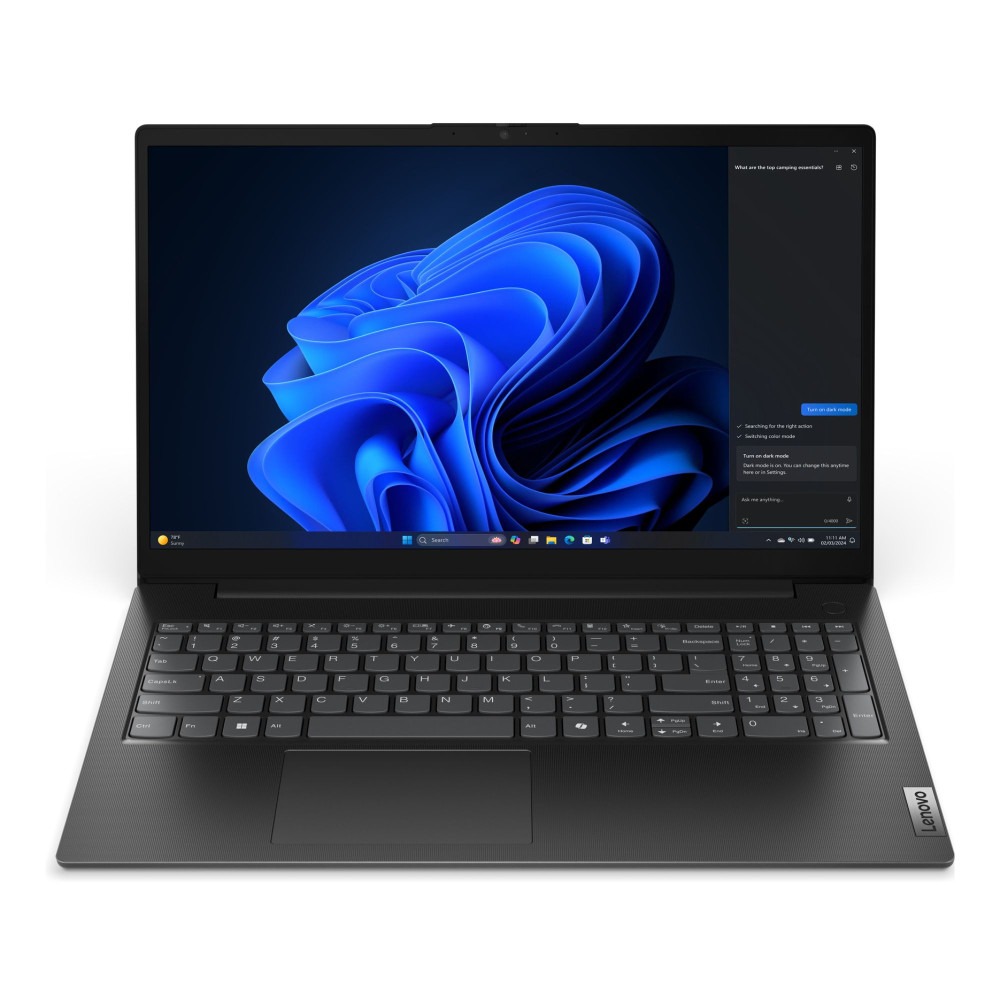
6. Best for Office and Spreadsheets: Lenovo V15 G5 (Intel Core i5 / 8GB / 512GB)
Best for: everyday office work, spreadsheets, admin tasks, remote work. The V15 G5 is Lenovo’s current business-oriented budget model, replacing the older V15 G4. It’s designed for people who spend most of their time in Office applications and browser tabs rather than heavy multitasking. For remote workers specifically, our best laptops for working from home guide has more options.
Configuration to look for: Intel Core i5-13420H, 8GB RAM, 512GB SSD, Windows 11 Pro. This is genuinely an 8GB-only configuration — there’s currently no 16GB/512GB V15 in stock under £500, so if 16GB RAM matters more to you than staying under budget, see the ASUS Vivobook 16 or HP 15 picks above instead.
*Price note: as of 25 September 2026, this listing is still priced at approximately £539.00 and remains well stocked (30 units available) — unchanged from our last check. It’s a few pounds above our £500 cutoff but the smallest overshoot of any pick that’s genuinely in healthy Amazon-direct stock — the ASUS Vivobook 16 pick above is the only other option under £500 right now with real availability, but with just 3 units left versus this one’s 30. Worth checking for a discount before buying if you want to land closer to £500.
Pros
- 8GB RAM is enough for spreadsheets, email and everyday Office use
- Business-focused design with good keyboard
- Close to our £500 budget line, with a full 512GB SSD and healthy stock (price note: ~£539 as of 25 September 2026)
Cons
- Webcam and speakers are basic
- Display panels vary — check reviews for specific model
- 8GB RAM only — not ideal if you regularly run many apps or browser tabs at once
7. Best Safe Budget Fallback: Acer Aspire 3
Best for: buyers who find a good deal and want a reliable everyday laptop. The Aspire 3 is one of the most recommended sub-£500 laptops in the UK — it’s widely available, well-reviewed, and consistently good value when you find the right configuration. The key is picking the right spec: Ryzen 5 or Core i5 with SSD storage.
Configuration to look for: Ryzen 5 or Core i5, 8GB RAM minimum (16GB ideal), 256GB SSD minimum (512GB preferred). Avoid the Celeron/Pentium versions.
*Price note: as of 25 September 2026, this listing (Core i5-1235U, 8GB, 512GB SSD) is still showing as currently unavailable — unchanged from our last check, so no live price could be confirmed and this pick still can’t be bought right now. Check back for restock, or see the Lenovo V15 G5 or ASUS Vivobook 16 picks above for currently in-stock alternatives.
Pros
- Excellent value when discounted
- Large screen for the price
- Widely stocked across UK retailers
Cons
- Cheap configs exist alongside good ones — check carefully
- Screen quality varies by model year
What Are the Most Common Mistakes When Buying a Budget Laptop?
- Buying the cheapest version of a laptop name — the base config often has weak RAM or storage. Always check the exact spec.
- Choosing eMMC or HDD instead of SSD — these are dramatically slower and will frustrate you within weeks.
- Assuming “500GB” means 500GB SSD — older HDDs were sold in 500GB sizes. If the listing says “500GB” without specifying SSD, it’s likely a spinning hard drive. Always confirm it’s an SSD.
- Ignoring screen resolution — a 1366×768 screen looks noticeably worse than Full HD (1920×1080). Worth checking before buying.
- Overpaying for a brand name with weak specs — a Dell or HP with 4GB RAM is worse value than a lesser-known brand with 16GB RAM.
Which Are the Best Laptops with 500GB Storage Under £500?
If you’ve landed here searching for “laptop 500gb” or “laptop with 500gb storage”, you’re in the right place. Every laptop in this guide comes with a 512GB SSD — the modern equivalent of 500GB — which shows as approximately 476GB available in Windows after formatting and the operating system installation.
For most UK buyers, 512GB SSD is the sweet spot at this price. It’s enough for Windows 11, Microsoft 365, a browser with dozens of tabs, and several years of documents and downloads — with room to spare. If you work with large video files or a big game library, pair any of these laptops with a portable 1TB SSD (under £50) for overflow storage.
Our top three picks for 500GB+ storage under £500 are the HP 15 (Ryzen 5, 16GB, 512GB), the ASUS Vivobook 16 (Intel Core 5, 16GB, 512GB), and the Lenovo IdeaPad 1 (16GB, 512GB). All three pair a 512GB SSD with 16GB RAM — the best all-round combination in this price bracket. Price update, 25 September 2026: of the three, only the ASUS Vivobook 16 is currently both genuinely under £500 and in healthy stock direct from Amazon — see the price note under each pick’s full review above before buying, as availability and price against the £500 line continue to shift week to week.
Frequently Asked Questions
Is £500 enough for a good laptop in the UK in 2026?
Yes — if you prioritise SSD storage and at least 8GB RAM (16GB is better). Many UK deals now offer Ryzen 5 or Core i5 laptops with 16GB RAM and 512GB SSD under £500. Avoid configurations with 4GB RAM or eMMC storage at any price.
What is the difference between a 500GB laptop and a 512GB laptop?
Nothing meaningful. Manufacturers measure storage using base-10 (1GB = 1,000,000,000 bytes), while operating systems use base-2 (1GB = 1,073,741,824 bytes). A “512GB SSD” shows as approximately 476GB in Windows. A “500GB” hard drive and a “512GB SSD” are essentially the same size — but the SSD is many times faster. Always choose SSD over HDD regardless of the exact size.
Should I choose Intel or AMD under £500?
Both are fine at this price point. AMD Ryzen 5 chips (particularly the 5000 and 7000 series) tend to offer slightly better performance per pound in budget laptops. Intel Core i5 (11th gen+) is also capable. Focus on the full configuration — RAM and SSD size — rather than the brand of chip.
Is 8GB RAM enough for a laptop in 2026?
It’s acceptable for basic tasks — browsing, email, light Office use. But if you want the laptop to feel quick for 3–4 years, 16GB RAM is worth paying for. Our guide to how much RAM you need breaks this down in detail.
Can budget laptops under £500 handle gaming?
Light or older games — yes. Modern AAA titles — no. All the laptops in this guide use integrated graphics (no dedicated GPU), which limits gaming performance. For gaming, you’ll need a budget of at least £600–700 to get a laptop with a discrete GPU like the Nvidia RTX 3050.
Which laptop here has the best 512GB SSD?
The HP 15, ASUS Vivobook 16 (Intel Core 5 120U) and Lenovo IdeaPad 1 all pair a 512GB SSD with 16GB RAM — the best combination for long-term use in this price range. As of 25 September 2026, the ASUS Vivobook 16 is the only one of the three that’s both genuinely under £500 and in stock direct from Amazon; the other two are currently either over budget or on a long dispatch lead time.
Is 500GB enough storage for a laptop?
For most people, yes. A 512GB SSD (the modern equivalent of 500GB) holds around 20,000 photos, 120,000 songs, or roughly 100GB of documents and downloads — with room to spare after Windows and your apps. If you store large video files or download many games, 1TB is worth considering, or add a portable SSD for overflow. All laptops in this guide include at least a 512GB SSD.
How much storage do I need on a laptop in 2026?
For everyday use — browsing, Office apps, email, streaming — 256GB is workable but 512GB gives you breathing room for several years. For photos, light video editing, or a few games, 512GB is ideal. For serious video editing or a large game library, 1TB is worth the extra spend. The golden rule: always choose SSD over HDD regardless of size. A 256GB SSD will feel dramatically faster day-to-day than a brand-new 1TB hard drive.
Keeping an eye on the budget elsewhere in the house too? Our Ring camera review and best home alarm system guide cover affordable ways to add security without overspending.
More Laptop Guides
- Best Laptops UK 2026 — All Budgets
- How to Choose a Laptop UK — Plain English Guide
- Best Laptops for Students UK 2026
- How Much RAM Do You Need in a Laptop?
Worth bookmarking before you buy: our Amazon UK Tech Deals hub tracks genuine laptop price drops around Amazon Prime Big Deal Days and Black Friday, so you can check whether a discounted price is actually lower than what a model has sold for recently.

Written by the TheTechVector Team
We research UK broadband, VPN, laptop, and mobile deals so you don’t have to. All prices are checked before publication — if something’s out of date, let us know.
Affiliate disclosure: TheTechVector earns a small commission if you buy via links on this page. This does not affect our recommendations or the price you pay.
This site contains affiliate links to products. We may receive a commission for purchases made through these links.
